

How Hospitals Provide Data to HQIP
HQIP uses three complementary data sources that hospitals already maintain or can obtain at no cost to support quality reports, benchmarking, and performance dashboards.
- NHSN infection data shared through the CDC NHSN group
- Hospital SIERA encounter files transferred directly to HQI’s contracted data-processing vendor
- HCAI Custom Limited Data Sets containing statewide patient-level comparison data
HQIP does not require a new data extract or EHR integration. Hospitals provide copies of files they already generate for HCAI and NHSN reporting.
Initial setup typically takes 1–2 hours, followed by only a few minutes for routine submissions.
| Step | Task | Who Usually Completes This | Typical Time Required |
| 1 | Join the HQI NHSN Group | Infection prevention coordinator | ~5 minutes |
| 2 | Transfer SIERA encounter files to the vendor-operated secure file-transfer site | IT staff, data analyst, or HCAI reporting staff | 30–60 minutes for initial setup |
| 3 | Request HCAI Custom Limited Data Sets | Quality department or data analyst | 10–15 minutes to submit the request |
Note: At enrollment, hospitals request the three most recent available years of HCAI data. Thereafter, they request one additional year annually. HCAI typically delivers approved files within 6–10 weeks.
Step 1 — Join the NHSN Group
(one-time setup)
Join HQI’s National Healthcare Safety Network (NHSN) Group through the CDC NHSN web portal. This step typically takes the infection prevention coordinator about five minutes to complete.
Joining the group authorizes HQI to automatically retrieve your hospital’s unit-level healthcare-associated infection (HAI) standardized infection ratios (SIRs) for use in HQIP reports and benchmarking dashboards.
This step only needs to be completed once. After joining the group, HQIP will automatically retrieve updated NHSN data each month.

Step 2 — Upload SIERA Data Files
(previous year + current year)
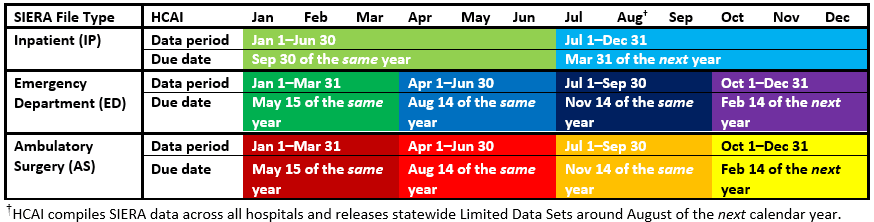
Under California law, hospitals submit Patient-Level Administrative Data to the California Department of Health Care Access and Information (HCAI) for inpatient, emergency department, and ambulatory surgery encounters through the SIERA portal.
To populate HQIP reports, hospitals transfer copies of the previous and current calendar year SIERA files already submitted to HCAI directly to HQI’s contracted data-processing vendor.
Files are transferred securely through a vendor-operated encrypted SFTP site. This step is typically completed by the same staff member who prepares or submits SIERA files to HCAI.
The initial transfer typically takes 30–60 minutes. After setup, transferring new quarterly files generally takes less than 10 minutes.
Most hospitals transfer SIERA files at the same time they submit them to HCAI, helping keep HQIP reports current throughout the year.
How to Upload SIERA Patient-Level Administrative Data for HQIP
Step 3 — Request Statewide HCAI Data (AB 2876)
(three years at enrollment; one additional year annually thereafter)
Hospitals participating in HQIP are contractually required to request HCAI Custom Limited Data Sets and transfer the approved files directly to HQI’s contracted data-processing vendor. Hospitals request the three most recent available years at enrollment and one additional year annually thereafter. The files include statewide inpatient, emergency department, and ambulatory surgery encounter data and support authorized historical benchmarking, longitudinal analyses, and other quality-improvement measures in HQIP.
Custom Limited Data Sets differ from HCAI’s Model Limited Data Sets because they include specific encounter dates and additional variables needed for longitudinal analyses and other complex quality measures. Documentation describing available variables is provided on HCAI’s Non-Public Data Documentation page.
Hospitals must submit the request through HCAI’s Data Request Portal.
How to Obtain HCAI Custom Limited Data Sets for HQIP at No Cost
When completing the request in the HCAI Data Request Portal, hospitals must upload the following documents:
1. Business Associate Agreement (BAA)
- A copy of the BAA between the hospital and HQI must be included with the request. HQI can provide a copy upon request by emailing HQIAnalytics@hqinstitute.org.
2. Custom Data Set Justification Grids
- PDD Custom Data Set Justification Grid
Used for the inpatient (PDD) data request. - ED/AS Custom Data Set Justification Grid
Used for both the emergency department (EDD) and ambulatory surgery (AS) data requests.
This grid must be uploaded twice — once for each dataset.
Once the request is approved, HCAI typically delivers the Custom Limited Data Sets within 6–10 weeks through its Secure File Transfer Protocol (SFTP) system.
Hospitals can download the files by following HCAI’s How to Download Your Data instructions.
After downloading the files, hospitals should request access to the vendor-operated secure file-transfer site by emailing HQIAnalytics@hqinstitute.org, then upload the files directly to HQI’s contracted data-processing vendor. HQI does not receive or access the raw files.
At enrollment, hospitals request the three most recent available years. Thereafter, they request one additional year annually, typically after HCAI releases the new statewide data around August.
How to Upload Files to HQI’s Contracted Data-Processing Vendor
Demos, Accounts, Questions, & Technical Support
Contact the HQI Analytics Team at: HQIAnalytics@HQInstitute.org
HQIP Platform: https://hqipanalytics.org